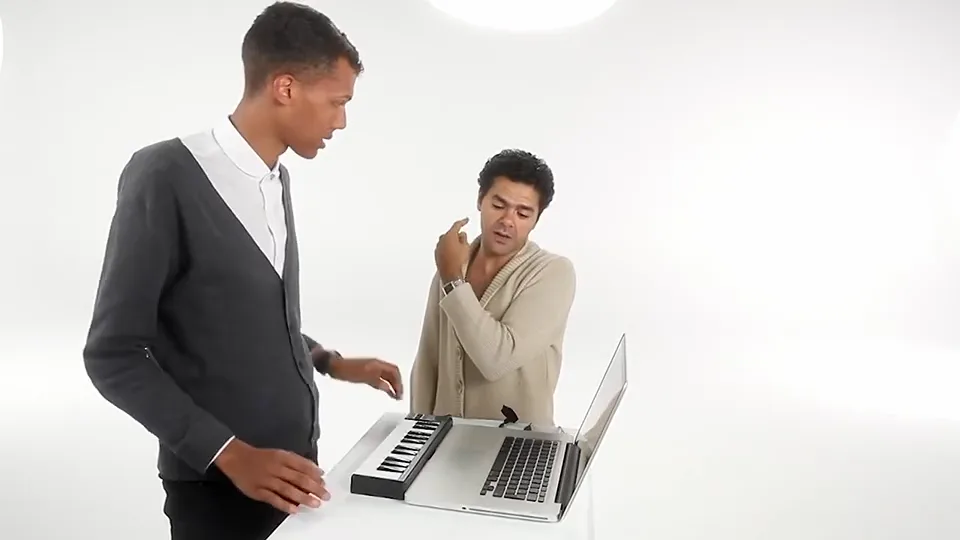
Put two people into the Alors on Danse white-studio meme. Upload two portraits or one couple photo: one plays the mini keyboard, the other reacts beside the laptop. 15 seconds, 480P or 720P.
Two adult portraits or one couple photo. Two photos. One white-studio duet.
Watch before you create
Alors on Danse AI Video Generator
Third-party white-studio trend example, not output generated by Genjutsu AI. Watch the keyboard role, laptop reactions and movement timing before uploading.
The Alors on Danse AI trend recreates the white-studio comedy format associated with Stromae and Jamel Debbouze: a keyboard player leans over the keys while a partner points, reacts and dances beside a laptop. This template uses a fixed 15-second excerpt. It is not a generic dance filter, a CapCut project, or an official artist service.
Upload your photos
Use two well-lit portraits with visible hair and clothing. Avoid faces hidden by hats, hands or sunglasses. A shared photo must clearly separate both adults. Check the keyboard and partner assignments before generating; swapping changes the roles, not the scene.
From references to your video.
Upload your photos
The left role plays the keyboard; the right role is the laptop and hype partner. Upload one authorized adult per photo, or a couple photo with two clearly visible faces. Swap roles before submitting if you want the other person at the keys. The model aims to retain the table, instruments, white studio and source timing; hands, expressions and fine details can vary.
Choose quality and generate
480P uses 1 video; 720P uses 2. Sign in with sufficient video uses to generate a 15-second video. 480P is the default.
Watch and download
Preview the 15-second MP4 with the template soundtrack. Download it here or find it later in My videos.
Alors on Danse AI video generator FAQ
What is the Alors on Danse AI video generator?
The Alors on Danse AI trend recreates the white-studio comedy format associated with Stromae and Jamel Debbouze: a keyboard player leans over the keys while a partner points, reacts and dances beside a laptop. This template uses a fixed 15-second excerpt. It is not a generic dance filter, a CapCut project, or an official artist service.
Does the video include the template music and vocals?
The application restores the template soundtrack after generating the visuals. It does not clone your voice. Generated mouth movements may not match every word.
Do I need a prompt, CapCut or Higgsfield?
No. Upload a portrait, choose quality, confirm permission and generate in your browser. The scene, target performer and performance direction are preset.
What changes, and what stays in the scene?
The left role plays the keyboard; the right role is the laptop and hype partner. Upload one authorized adult per photo, or a couple photo with two clearly visible faces. Swap roles before submitting if you want the other person at the keys. The model aims to retain the table, instruments, white studio and source timing; hands, expressions and fine details can vary.
What kind of photo works best?
Use two well-lit portraits with visible hair and clothing. Avoid faces hidden by hats, hands or sunglasses. A shared photo must clearly separate both adults. Check the keyboard and partner assignments before generating; swapping changes the roles, not the scene.
Is Alors on Danse AI free, and which quality can I choose?
Public examples are free to watch; personalized video generation is paid, with no free generated-video preview. Sign in with sufficient video uses. A 15-second 480P video uses 1; 720P uses 2. 480P is the default. See Pricing for packages.
Can I make a Alors on Danse AI video on my phone?
Yes. Use your mobile browser to upload, generate, preview and download the landscape 15-second MP4. No separate editing app is required.
Is this official, and can I share the result?
Genjutsu AI is independent and is not affiliated with Alors on Danse. Only upload your own or authorized photos. Check rights to the visuals and soundtrack before publishing, especially for commercial use.
AI Video Tools
Compare Hotel Lobby, Zombie Couple and Bulin 47 / Burning Bridges with playable examples, photo requirements and a direct route to each generator. Alors on Danse · Nicole Kidman Dance · Closed on Sunday.