The cabin encounter
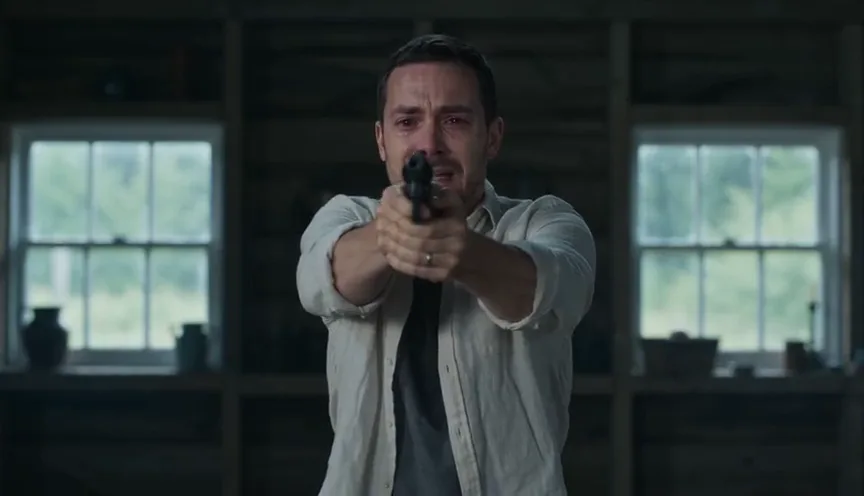
The preset opens with a tearful survivor and an infected partner. Closeups establish the two characters before the survivor lowers the gun and opens their arms.
 Genjutsu AI
PHOTO-TO-VIDEO TOOLS
Turn two portraits or one couple photo into a Zombie Couple AI video: a tense cabin encounter, a jumping hug and a warm wheat-field memory. Watch the trend reference, then make your own 15-second story. No prompt or reference-video upload needed.
Assign the human and zombie roles with two portraits or one couple photo.
Watch before you create
The selected trend reference shows a tense cabin encounter, a jumping embrace and a wheat-field reunion. This video comes from aizombie.video; it is not an output generated by this website. Your result follows the preset story and may differ in likeness, motion and cuts.
 Trend reference
Third-party trend reference, not a video generated by this website. It shows the target effect; it does not promise the same result here.
Reference source: aizombie.videoA ZOMBIE LOVE STORY, MADE WITH YOUR PHOTOS
A Zombie Couple AI video turns a familiar horror scene into a reunion. One character is infected; the survivor hesitates, lowers a gun and opens their arms. A jumping embrace carries the story from a cold cabin to a healthy memory in a golden wheat field. This photo-to-video template supplies the scene direction, so you can focus on choosing the two characters.
The preset opens with a tearful survivor and an infected partner. Closeups establish the two characters before the survivor lowers the gun and opens their arms.
The infected partner approaches and jumps into the survivor’s arms. The receiving movement and supported embrace are the central moment of this zombie couple video.
The embrace transitions into a warm field, where the same partner appears healthy. A gentle closeup ends the reunion. Movement and transition timing vary between generations.
Use separate portraits for clearer role assignment, or a single photo with two distinct adults. The first or left person is the survivor; the second or right person is the infected partner. Swap the roles before generating if needed.
Choose sharp, well-lit faces without sunglasses, masks or heavy filters. Keep hair and clothing visible. The zombie look is prepared automatically; you do not need to edit the photos first.
Upload JPG, PNG or WebP images, up to 10 MB each. Only use adults’ photos that you own or have permission to use, and confirm the material authorization before submitting.
This sample is a third-party trend reference, not a video generated by this website. Your photos are used to generate a new video; faces, movements, framing and transition timing may differ from the reference.
Choose two portraits or one couple photo. Assign the survivor and infected partner, then confirm you have permission to use the photos.
Sign in with enough video uses. Standard 768P uses one video; eligible 2K uses two. The tool prepares the zombie character and generates the preset story automatically.
Watch the finished clip beside the generator. You can also open My videos from your account menu and download the result there.
It is a photo-based cinematic reunion: a survivor meets an infected partner in a cabin, a jumping hug connects the encounter to a healthy memory in a wheat field. This tool creates a new version with the two adults from your photos.
Upload one portrait for the survivor and one for the infected partner. Confirm the roles, choose a quality, sign in with enough video uses and generate. The preset supplies the story and scene direction.
Yes. Choose the couple-photo tab and upload a clear photo of two distinct adults. The left person is the survivor and the right is infected unless you swap their roles.
No. Upload your regular photos. The tool prepares the infected partner’s reference and applies the built-in cabin-to-wheat-field story automatically.
Watching the sample is free. Generating requires sign-in and sufficient video uses. Standard 768P uses one video; eligible 2K uses two. The generate button shows the count before submission. See Pricing for current packages.
The preset requests about 15 seconds in landscape 16:9. Output length may vary slightly. This page does not currently offer a vertical-format selector.
Use sharp, well-lit adult faces with hair and clothing visible. Avoid covered faces, strong filters and overlapping people. JPG, PNG and WebP files are supported, up to 10 MB per photo.
Yes. The first portrait or left person in a couple photo is the survivor; the second portrait or right person becomes infected. Use the role-swap control before submitting to reverse them.
No. The preset follows a similar cabin, jumping-embrace and wheat-field story, but generates new footage. Faces, poses, camera framing and transition timing can vary. The displayed sample is a third-party trend reference, not a result generated by this website.
Finished videos include the template background soundtrack. Generated movements and cuts may not align with every beat. It is not a voice-cloning or lip-sync tool.
Yes, use the website in a mobile browser to upload photos and generate. View the finished video beside the tool or open My videos from the account menu to download the MP4. Technical generation failures return the original video uses.
Only upload adult photos you own or have permission to use. Confirm the material-authorization declaration and follow the acceptable-use policy. Do not use the tool to impersonate someone or create non-consensual content.
Compare Hotel Lobby and Zombie Couple with playable examples, photo requirements and a direct route to each generator.
 Example video
Create a two-person orange-booth performance from photos.
Trend referenceSee the zombie love-story sequence: encounter, recognition, hug, flashback.